Boost Tuning
Adjusting boost solenoid duty cycle at full throttle
The Boost page helps you tune the open-loop boost control duty cycle table and the target boost table. It shows the relationship between solenoid duty cycle and achieved boost pressure from your logs, then lets you adjust the tables so the engine hits its target boost curve.
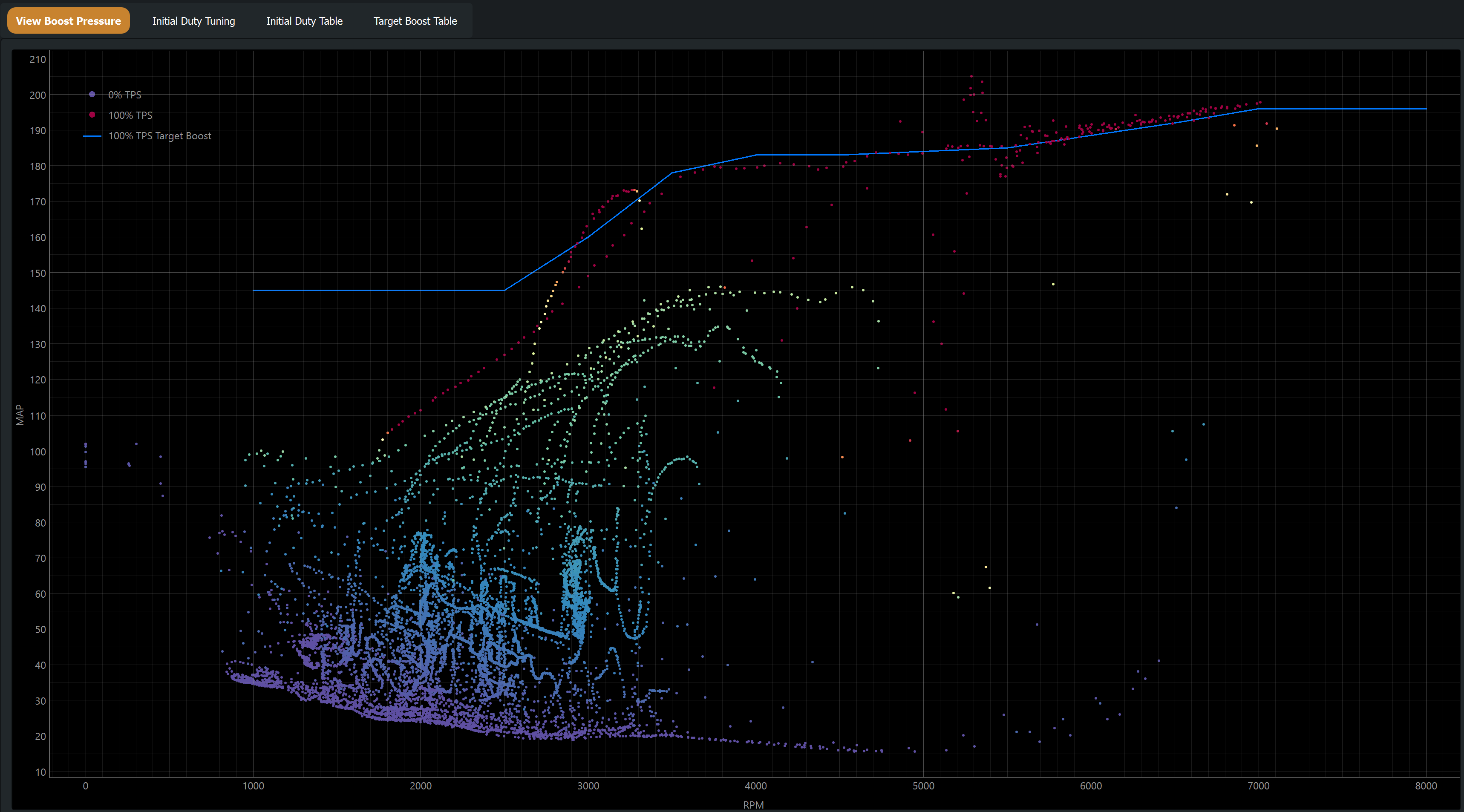
What the page shows
Only full-throttle data is used on this page (TPS above the threshold defined in Settings, default 80 %). This focuses the analysis on the conditions where boost control is most critical.
Tabs
The Boost page is split into four tabs:
- View Boost Pressure
- Scatter of logged RPM vs MAP, coloured by throttle position. The blue line shows your target boost pressure from the boost-target table. Use this tab to spot where the engine is over- or under-shooting target.
- Initial Duty Tuning
- Scatter of required duty cycle vs RPM, calculated from the difference between logged MAP and target MAP through the solenoid multiplier model. The line shows the current open-loop duty table; adjust the table to follow the scatter cluster, or press Auto to have the full-throttle row fitted for you (see below).
- Initial Duty Table
- The raw open-loop boost duty cycle table. Edit cells directly with the standard table editing shortcuts (see Keyboard Shortcuts).
- Target Boost Table
- The boost target table that defines what MAP the boost controller is aiming for at each RPM. Adjustments here drive the blue target line in the other tabs.
How to tune boost duty
- Ensure your ECU has a target boost table loaded. The blue target line is derived from this.
- Log several full-throttle runs covering the RPM range. It doesn't matter if other data is also in the logs.
- Make any desired adjustments to the Target Boost Table.
- On the Initial Duty Tuning tab, adjust the duty cycle to match the calculated required-duty scatter, or press Auto and review what it suggests.
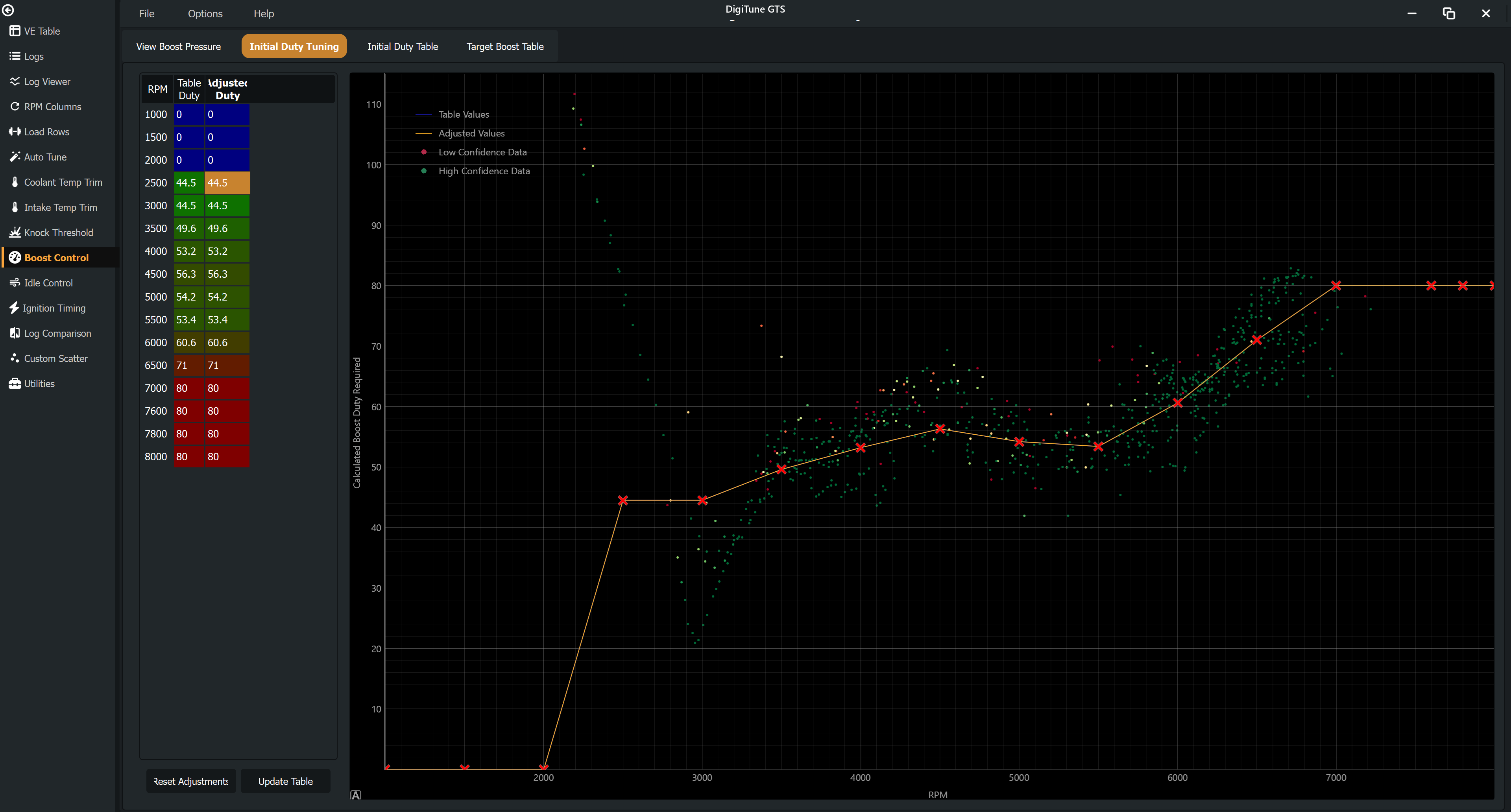
- Click Update to commit, save the file and load it to the ECU, then collect another log to verify.
What Auto does
Auto fits the full-throttle duty row to the log and fills the Adjusted Duty column for you to review; nothing reaches the table until you click Update. It is built to err under target rather than over:
- One duty per RPM has to serve every gear. In a high gear the RPM climbs slowly, the turbo has longer to spool, and the same duty makes more boost. Auto sets each RPM for the conditions that made more boost per duty than three quarters of the log (the Conservatism setting), so a slow-climbing gear does not overshoot and a low gear sits a little under target while it spools.
- Boost that had not settled says nothing about the duty needed, unless it was already over target — an overshoot is believed at once, a shortfall only once the boost has stopped climbing.
- Where the turbo could not reach target, nothing is invented. Below the spool point the wastegate is shut whatever the duty, so those samples are set aside, a raise is capped per pass, and an RPM the car overshot at is never raised. Lowering is not capped.
- RPM the log never reached at full throttle keep the values you have.
- Gear changes are left out of the fit and reported: the boost spike after a lift is not something the duty table can fix.
Closed-loop tunes are included: the duty the solenoid actually ran (base plus the PID's correction) is what the fit reads, and the change goes into the base table so the loop has nothing left to correct. On ME the GPT-driven boost solenoid is handled the same way.
Relevant settings
| Setting | Default | Description |
|---|---|---|
| Boost Control Minimum TPS | 80 % | Below this throttle position, data is excluded from the boost page. |
| Boost Control Full Throttle Req. Time | 1.0 s | Minimum duration the throttle must be above the threshold before a data point counts. |
| Boost Control Response Rate | 1.0 kPa/% | Expected MAP change per unit of duty cycle change. Used to scale suggested corrections. |
| Boost Control Maximum Error | 30 kPa | Data points further than this from the target boost are excluded as outliers. |
| 100% Duty Boost Multiplier | 2.5× | Relative boost expected at 100% vs 0% duty. Defines the response curve shape, and is the model Auto reads every sample through. |
| Auto Set Conservatism | 75 % | Which slice of the turbo's response Auto fits to. 75 sets the row for the conditions that made more boost per duty than three quarters of the log; 50 fits the typical condition. |
| Auto Set Overshoot Tolerance | 5 kPa | Over target by more than this is an overshoot: believed while the boost is still rising, and an RPM with a second of it is never raised. |
| Turbo Response Time | 0.5 s | How long the turbo takes to answer the solenoid. Each sample is credited to the duty and RPM of that much earlier. |
| Auto Set Settle Rate | 25 kPa/s | Boost moving faster than this has not settled; a sample below target only counts once it has. |
| Auto Set Max Raise | 20 % | The most Auto may raise any one RPM in a single pass. Lowering is not capped. |
| Auto Set Smoothing | 50 % | How strongly the suggested correction resists kinks between adjacent RPM. It smooths the correction, never the row. |
| Auto Set Reach | 500 RPM | How far either side of the logged RPM a correction is carried before fading back to your own row. |
| Auto Set Min. Full Throttle Time | 3 s | Settled full-throttle time at an RPM before Auto trusts it fully. |
See Settings Reference to adjust these.