Idle Tuning
Tuning the open-loop idle solenoid duty cycle by coolant temperature
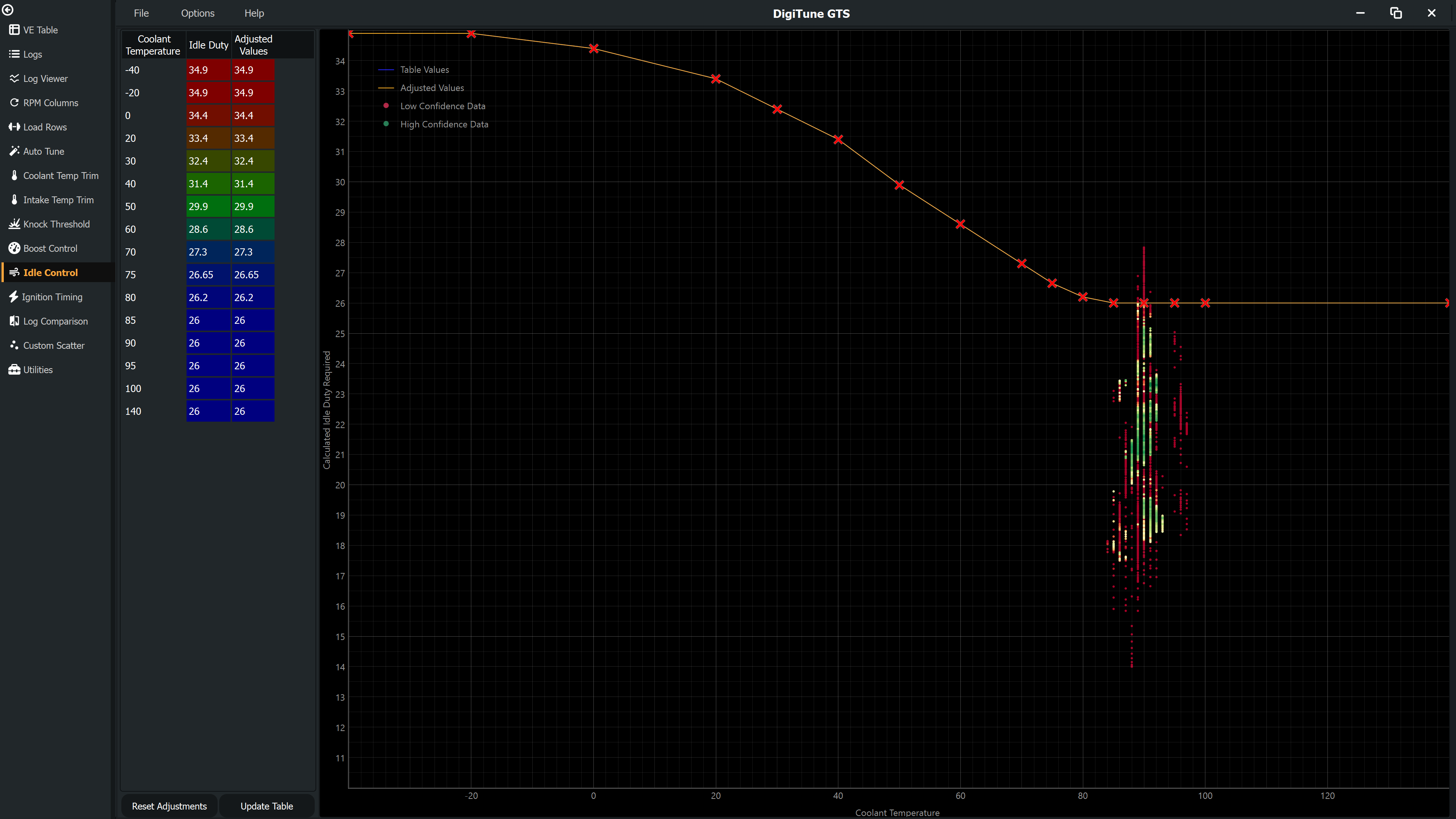
The Idle page helps you set the open-loop idle control duty cycle for each coolant temperature breakpoint. It extracts stable idle periods from your log data and shows you what duty cycle was being used and what RPM was achieved, so you can work backwards to the duty that hits your target idle speed.
What counts as a valid idle point
Not all low-throttle data is useful for idle tuning. DigiTune GTS applies several filters to extract only genuinely stable idle periods:
- Throttle position must be near zero (no driver input).
- The idle control system must have been active for at least the Idle Settling Time (default 5 s) to allow closed-loop control to stabilise.
- RPM, MAP and the idle valve duty must all be steady for that same window, within the expected variation thresholds.
Points that pass all filters are shown as scatter on the graph. The X axis is coolant temperature; the Y axis is duty cycle. Colour indicates data quality as on other pages.
Being off target is not a fault and is not penalised — it is the measurement. The Y value plotted is the duty that would have held your target RPM, worked back from the duty that was applied and how far off target the engine actually sat. What is penalised is the engine not holding still: a hunting idle tells you nothing about which duty is right, however close to target its average happens to be.
How to tune
- Collect logs that include cold-start idle (for low CLT cells) and fully warm idle (for high CLT cells). Let the engine idle for at least 10–15 seconds at each condition.
- On the Idle page, look at where the scatter sits relative to the current table line at each CLT breakpoint.
- If idle RPM was too low at a given temperature, the duty needs to increase at that CLT. If too high, decrease it.
- Use the Idle RPM Response Rate setting (RPM per % duty, default 20) to estimate how much to change the duty value to achieve a given RPM correction.
- Edit the table values, click Update, save, and collect a new log to verify.
Auto
Auto does all of that at once: it fits a duty curve through the scatter and fills in the Adjusted column for you to review. Nothing is written to the table until you click Update, and nothing reaches your file until you save the map, so it is always safe to press and look at.
Three things about it are worth knowing, because they decide what you get:
- It fits the curve the ECU actually uses. Your ECU interpolates between the temperature breakpoints, so a sample taken at 87 °C is evidence about the 85 °C and 90 °C points together, and it is entered that way rather than being rounded to the nearest one.
- Beyond your logged temperatures it carries your own curve. A typical log gives data at about nine of the sixteen breakpoints, and a warm-idle-only log gives one or two. Out there Auto keeps the shape you tuned and shifts it by the correction at the edge of your data, rather than snapping back to the old values and leaving a step in the middle of the curve. Auto Set Edge Carry controls that; set it to 0 and the untouched temperatures keep their exact values instead.
- The finished curve is smoothed. A correction that moves half the axis and not the other half leaves kinks that were never in your data. Auto Set Curve Smoothing irons those out, giving way first at the breakpoints your log never measured and leaving the ones it did where the data put them.
- The result never rises as the engine warms. A duty curve that goes up with coolant temperature is the wrong shape for an engine, and at the cold end it is a stall. Holding the unmeasured part of the curve makes one surprisingly easily — the correction has to come back to your own numbers on both sides of the measured band, and most curves are flat across their hot end — so the suggestion is projected onto the nearest non-increasing curve before you see it, giving way first where the data was thinnest.
Auto does not limit how far it moves a point. It is a suggestion you read before applying — nothing is written until you click Update — and a limit there would not make a wrong suggestion right, it would make it a wrong suggestion that looked reasonable. If your log says the table is 15 % out, that is what you will see. What it will never do is leave the idle valve's own duty range: the curve is held inside PWM Min Duty and PWM Max Duty from your own idle settings. Set Auto Set Max Change above 0 if you would rather it moved in smaller steps.
Applying an Auto suggestion also sets Idle Settings > Exit Idle Duty to your warm (90 °C) idle duty plus 5 %. That setting is the duty held as the ECU leaves idle control, so it describes the same valve as this curve does and a retuned curve leaves it wrong. It is written only when you click Update on a curve that came from Auto — edit the table by hand and your own setting is left alone — and set Auto Set Exit Duty Margin to 0 to stop it happening at all.
The surest answer for the cold end is still to log a cold start, so the whole curve has data behind it rather than a carried correction.
One thing Auto deliberately does not do is add stall margin. Measured across 165 client jobs, tuners add about 2 % of idle duty on top of whatever the log asked for, which is a judgement about cold starts, air conditioning and clutch dips that a steady idle log contains nothing about. Auto reports what your log says.
Margin belongs in the idle controller rather than in this table, and that is where DigiTune's own idle settings put it: CL RTI Inc(%) and CL Start Inc(%) are the closed-loop controller's authority to add duty when returning to idle and when starting. Duty added there is spent only when the engine needs it; the same amount added to this curve is spent all the time, at every temperature.
If Auto says there is not enough settled idle to answer, that is what it means: let the engine idle undisturbed for longer, or check that the idle controller was actually in control (a car that never reaches its idle target is not producing idle data at any length).
Relevant settings
| Setting | Default | Description |
|---|---|---|
| Idle RPM Response Rate | 20 RPM/% | Expected RPM change per unit of duty cycle. Used to scale correction suggestions. |
| Idle Averaging Filter Time | 2.0 s | Time window used to smooth duty readings before averaging. |
| Idle Settling Time | 5.0 s | Time the idle controller must have been active before data is considered valid. |
| Idle Req. Time for Valid | 5.0 s | Minimum consecutive stable idle time required for a point to be included. |
| Expected RPM Variation | 20 RPM | Average idle RPM wander across the settling window treated as normal. A healthy closed-loop idle wanders — that wander is the controller working. |
| Expected MAP Variation | 3.0 kPa | Average idle MAP variation across the settling window treated as normal. |
| Expected Duty Variation | 1.5 % | Average idle valve movement across the settling window treated as normal. The idle PID is never completely still. |
| RPM / MAP / Duty Variation Penalty | 1.5 / 1.0 / 5.0 | Quality points removed per unit of average variation beyond each expected figure. |
| Allowed RPM Error | 50 RPM | Deviation from target idle RPM before quality is reduced. Being off target is the measurement, not a fault — until the correction that backs it out saturates. |
| Auto Set Smoothing | 50 % | How strongly the suggested curve resists kinks between adjacent temperatures. It smooths the correction, never your curve. |
| Auto Set Min. Idle Time | 5.0 s | Idle time recorded at a temperature before Auto trusts it fully. |
| Auto Set Reach | 15 °C | How far either side of your logged temperatures a correction carries before fading back to your own curve. |
| Auto Set Max Change | 0 (no limit) | The most Auto may move any one point of the curve. 0 means no limit. The curve is always kept inside the idle valve's own duty range whatever this says. |
| Auto Set Curve Smoothing | 50 % | How strongly the finished curve is smoothed. Unlike Auto Set Smoothing, which smooths the correction, this smooths the result. |
| Auto Set Exit Duty Margin | 5 % | How far above warm (90 °C) idle duty Auto puts Idle Settings > Exit Idle Duty when you apply a suggested curve. 0 leaves the setting alone. |
| Auto Set Edge Carry | 100 % | How much of the correction at the edge of your logged range is carried outward past it. 0 goes back to the values already in the table, which puts a step at the edge of the data. |
See Settings Reference to adjust these.